Focus on the part you need
Practise the left hand, right hand or both. The note guide groups notes by hand and highlights the current notes, with measure positions to help you find your place.
SEE THE NOTES ON THE KEYS
Connect the notes on the page with their place on the piano. Stavewise shows animated hands, highlighted keys and a note guide while you practise at a pace you choose.
Explore the public-domain Bach demo without an account. Your own score imports require membership.
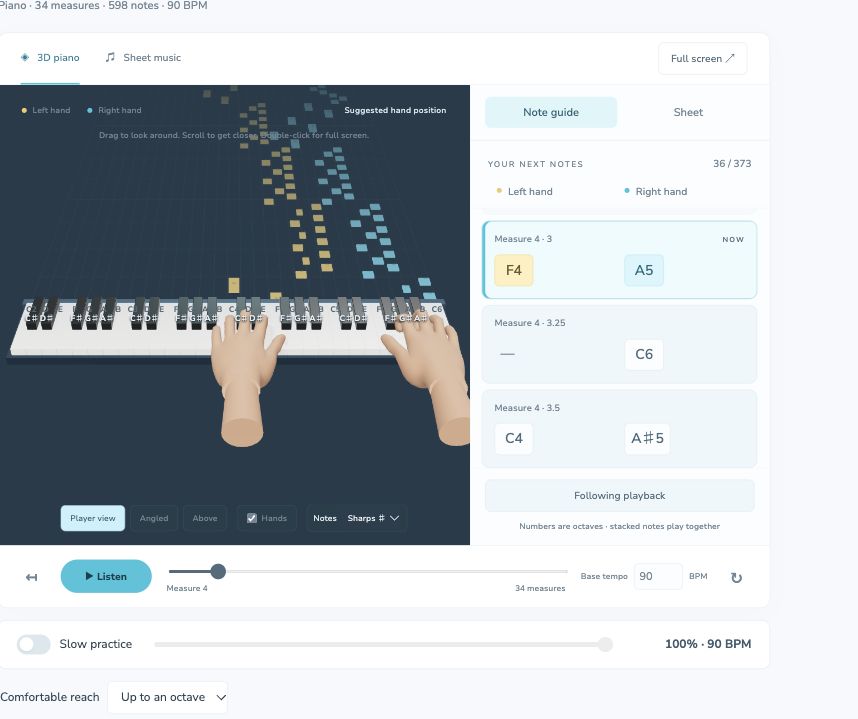
Practise the left hand, right hand or both. The note guide groups notes by hand and highlights the current notes, with measure positions to help you find your place.
Choose Player view, Angled or Above. Drag to rotate the piano, zoom to see a passage and use full screen when you want more room for the keys and note guide.
Slow practice adjusts playback and hand movement together. Follow along continuously or use Wait for me to advance one expected note or chord at a time.
Printed fingerings in your MusicXML score and your own edits take priority. For other notes, Stavewise suggests fingering based on the upcoming passage, key positions and your selected comfortable reach: a sixth, octave or ninth.
These are adjustable software suggestions. They have not been validated as personalised piano technique by a teacher. Review awkward reaches and hand movements, and change a suggestion in Review notes when another fingering works better for you. Microphone feedback cannot verify which finger you actually used.
The 3D guide also follows phrase practice. Choose one or two bars, hear the demonstration and play after the count-in. The guide keeps moving with the beat; afterwards, review estimates of early, late and missed note starts.
Use headphones so the microphone hears your piano rather than the demonstration. Feedback estimates pitches and note starts; it does not assess pedal use, finger technique or exact note lengths.
Members can import MusicXML or MXL, or read a PDF or photo and review the recognised notes. The guide follows that practice score.
You can use your browser’s microphone for note and phrase feedback. Results depend on the instrument, microphone and room; low bass, pedal resonance, noise and dense chords can affect recognition. You can also explore using the on-screen piano keys.
The guide helps you locate notes and rehearse a passage. It does not assess posture, tension, musical expression or your actual fingering. A teacher can help you judge technique and choose a comfortable approach.
The free studio demo includes Bach’s public-domain Invention No. 8, with the 3D piano, hand selection, slow practice and microphone modes. Importing your own scores requires membership with a 7-day free trial for new members, then $10 USD per month.
Open the demo, choose a hand and try Bach’s Invention No. 8 at a comfortable tempo.
Try the free demo →